Walk into any hardware store and you will see two numbers plastered on almost every power tool — torque and speed. On a drill it might say 820 in-lbs and 2,000 RPM. On an impact driver 1,825 in-lbs and 3,250 IPM. On a circular saw 5,000 RPM and 70 ft-lbs.
Most buyers glance at these numbers, assume bigger is better, and move on. But that approach leads to buying tools that are wrong for the job — either underpowered for demanding work or overpowered and hard to control for delicate tasks.
This guide explains what torque and speed actually mean, how they relate to each other, and — most importantly — which one matters more for every common power tool task.
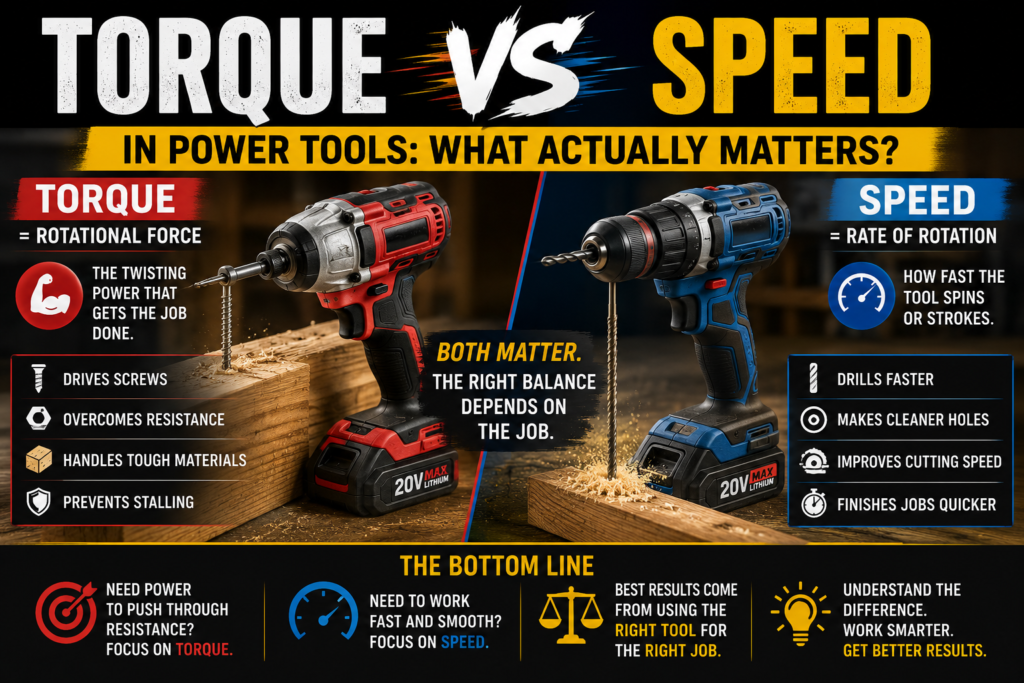
What Is Torque?
Torque is rotational force. It is the twisting power that a motor applies to whatever it is driving — a drill bit into wood, a screw into metal, a blade through timber. Think of it like the strength of a grip — a higher torque means a stronger, more forceful rotation.
Torque in power tools is measured in:
- In-lbs (inch-pounds) — used for drills and impact drivers
- Nm (Newton metres) — the metric equivalent, used globally
- Ft-lbs (foot-pounds) — used for impact wrenches and high-torque tools
To convert: 1 ft-lb = 12 in-lbs = 1.356 Nm
High torque is what you need when resistance is high — drilling into hardwood, driving long screws, cutting through thick material. Without enough torque the tool bogs down, slows dramatically, and either stalls or strips the fastener.
What Is Speed?
Speed in power tools refers to how fast the output shaft rotates or reciprocates. It is measured in:
- RPM (revolutions per minute) — how many full rotations per minute for drills and saws
- IPM (impacts per minute) — how many impact strokes per minute for impact drivers
- SPM (strokes per minute) — for reciprocating saws and jigsaws
High speed means the tool completes more rotations or strokes in a given time. For drilling small holes in soft material, high speed produces cleaner, faster results. For cutting with a circular saw, higher blade RPM means smoother cuts in most materials.
The Relationship Between Torque and Speed
Here is the key insight most buyers miss — torque and speed are inversely related in most power tools. When one goes up, the other tends to go down under load. This is not a flaw — it is physics.
Imagine pushing a bicycle up a hill in high gear versus low gear:
- High gear — you move faster but need more leg strength (high speed, low torque)
- Low gear — you move slower but can push through resistance more easily (low speed, high torque)
Power tools work the same way. This is why quality drills have two speed settings — high speed for drilling small holes in soft materials, low speed for driving screws or drilling large holes where you need more torque to push through resistance.
According to Engineering Toolbox, the relationship between torque, speed, and power is fixed by the formula: Power = Torque × Speed. At a given power output, increasing torque requires reducing speed and vice versa.
Torque vs Speed — Which Matters More for Each Task?
| Task | Torque importance | Speed importance | Which matters more |
|---|---|---|---|
| Driving long screws into hardwood | 🔴 Critical | 🟢 Low | Torque |
| Drilling small holes in softwood | 🟢 Low | 🔴 Critical | Speed |
| Drilling large holes in hardwood | 🔴 Critical | 🟡 Moderate | Torque |
| Drilling into metal | 🟡 Moderate | 🟢 Low (slow is better) | Torque + slow speed |
| Cutting timber with circular saw | 🟡 Moderate | 🔴 Critical | Speed |
| Driving drywall screws | 🟢 Low | 🔴 Critical | Speed |
| Removing stubborn bolts | 🔴 Critical | 🟢 Low | Torque |
| Mixing paint or mortar | 🔴 Critical | 🟢 Low | Torque |
| Sanding with orbital sander | 🟢 Low | 🔴 Critical | Speed (OPM) |
Torque and Speed in Specific Tools
Cordless Drills — Both Matter, Differently
A cordless drill uses torque for driving screws and speed for drilling holes. This is why quality drills have two gear settings — gear 1 (low speed, high torque) for driving, gear 2 (high speed, lower torque) for drilling. The clutch system adds another layer of torque control by disengaging the drive at a preset resistance level.
For most home users, 400 to 600 in-lbs of torque and 1,500 to 2,000 RPM covers everything adequately. The mistake is buying a drill purely on maximum torque — if you are only driving cabinet screws you do not need 820 in-lbs. For detailed drill comparisons read our DeWalt vs Makita Drills guide.
Impact Drivers — Torque Rules
Impact drivers deliver torque in rapid bursts — this is what IPM measures. Higher IPM means more torque bursts per minute, which generally means faster fastening. But the peak torque figure (in-lbs) is what determines whether the tool can actually drive a specific fastener under high resistance.
For typical residential use 1,500 in-lbs is more than enough. For professional construction and structural fastening, 1,800 to 2,000 in-lbs provides meaningful extra capability. For our full impact driver breakdown read our Impact Driver vs Drill guide.
Circular Saws — Speed Rules
For circular saws, blade speed (RPM) is the primary performance metric. Higher RPM generally means smoother cuts in wood because each tooth takes a smaller bite per revolution. However at very high speeds in dense hardwood, blade heat becomes an issue — the optimal speed depends on the material and blade tooth count.
Most quality cordless circular saws run between 4,000 and 5,800 RPM — adequate for all typical residential cutting tasks. For blade selection guidance read our Circular Saw Blade guide.
Impact Wrenches — Maximum Torque
Impact wrenches are pure torque tools. Their entire purpose is to apply maximum rotational force to large fasteners — wheel nuts, structural bolts, heavy machinery. For impact wrenches torque (in ft-lbs) is the only specification that matters for selecting the right tool for the job. Speed is largely irrelevant.
Angle Grinders — Speed Dominates
Angle grinders are rated in RPM and the disc size determines the appropriate speed range. Larger discs require slower speeds — using a large disc at speeds designed for smaller discs creates dangerous disc stress. Always match disc size to the grinder’s rated RPM. For grinding and cutting applications the surface speed of the disc edge matters more than RPM alone.
How Clutch Settings Relate to Torque Control
The clutch on a cordless drill is a torque-limiting device. Setting the clutch to position 5 means the clutch disengages when resistance reaches approximately that torque level — protecting screws from being stripped and surfaces from being damaged.
Understanding this makes clutch selection intuitive:
- Low clutch setting (1–5) — for small screws in soft materials like drywall
- Mid clutch setting (6–12) — for medium screws in softwood and plywood
- High clutch setting (13–15+) — for large screws in hardwood
- Drill mode (drill bit icon) — bypasses clutch entirely for drilling holes
More clutch settings give you finer torque control. This is why the Makita XFD131 with 21 clutch settings is preferred by finish carpenters over models with only 15 settings — finer control prevents damage on delicate work. Read our Makita XFD131 review for a detailed look.
Common Torque and Speed Mistakes
Using Too Much Speed on Metal
Drilling metal requires slow speed and steady pressure. High speed generates heat that dulls bits rapidly and can work-harden the metal surface making drilling progressively harder. Always switch to gear 1 and use cutting fluid when drilling metal.
Using Too Little Torque on Hardwood
Driving screws into oak, maple, or other hardwoods with insufficient torque causes the tool to bog down, the screw to strip, or the bit to cam out. Pre-drilling a pilot hole reduces the torque demand significantly — always pilot drill hardwood before driving screws.
Ignoring Two-Speed Settings
Many users leave their drill in gear 2 (high speed) for everything. This wastes battery when driving screws and causes rough holes from too-fast drilling in hardwood. Switching to gear 1 for driving and large-hole drilling extends battery life and improves results.
Chasing Maximum Torque Numbers
Marketing departments inflate torque figures by measuring peak torque under ideal conditions. Real-world torque under sustained load is always lower. A 500 in-lbs drill from a reputable brand typically outperforms an 800 in-lbs figure from a budget brand in actual use. Focus on brand quality and user reviews alongside specifications.
⚙️ Torque or Speed? — Find What Matters for Your Task
Select your tool and task below to get an instant breakdown of which spec matters most and what to look for.
Quick Reference — What Numbers to Look For
| Tool | Key spec | Minimum for home use | Good for professionals |
|---|---|---|---|
| Cordless drill | Torque (in-lbs) | 300 in-lbs | 600+ in-lbs |
| Impact driver | Torque (in-lbs) | 1,500 in-lbs | 1,800+ in-lbs |
| Circular saw | Speed (RPM) | 4,000 RPM | 5,000+ RPM |
| Impact wrench | Torque (ft-lbs) | 150 ft-lbs | 300+ ft-lbs |
| Angle grinder | Speed (RPM) | 8,500 RPM (4.5 inch) | 10,000+ RPM |
| Jigsaw | Speed (SPM) | 2,000 SPM | 3,000+ SPM |
For more detailed guidance on specific tools read our Complete Drill Buying Guide, our Best Impact Drivers ranking, and our Impact Driver vs Circular Saw comparison.
Frequently Asked Questions
Is higher torque always better in a drill?
No. Too much torque without proper clutch control strips screws, splits wood, and damages surfaces. The right torque level depends entirely on the task. For most home DIY tasks 300 to 500 in-lbs is perfectly adequate — high torque numbers are only meaningful for demanding professional applications like driving structural screws into dense hardwood or operating mixing paddles in heavy mortar.
What does no-load speed mean on a drill?
No-load speed is the RPM measured when the drill is running freely with no resistance. Under actual load — drilling into material — the speed drops significantly. A drill rated at 2,000 RPM no-load might run at 1,200 to 1,500 RPM when drilling hardwood. This is normal. No-load speed is useful for comparison between models but does not reflect real-world drilling speed under resistance.
Why does my drill slow down when I push harder?
This is the torque-speed relationship in action. As you push harder the resistance increases. The motor responds by drawing more current to maintain rotation — but under high load it cannot maintain the same speed. The motor slows down and delivers more torque. If resistance exceeds the motor’s capability the tool stalls completely. This is why brushless motors perform better under heavy loads — they manage current more efficiently and maintain performance longer before stalling.
Does more RPM mean a better circular saw?
Not necessarily. RPM must match the blade and material. Most 7.25 inch circular saws run between 4,500 and 5,800 RPM — all adequate for typical timber cutting. Beyond a certain point, higher RPM increases blade heat and noise without meaningful cutting performance improvement for residential use. Blade quality, tooth count, and motor torque matter more than chasing maximum RPM in a circular saw.
What is the difference between in-lbs and Nm of torque?
They are different units measuring the same thing — rotational force. To convert: multiply Nm by 8.85 to get in-lbs, or divide in-lbs by 8.85 to get Nm. For example, 530 in-lbs equals approximately 60 Nm. European and Asian tool brands often list torque in Nm while North American brands typically use in-lbs. Always convert to the same unit before comparing specifications between brands.
Should I choose a drill based on torque or clutch settings?
Both matter, but for different reasons. Torque determines maximum capability — whether the tool can physically handle the task. Clutch settings determine control — how precisely you can limit torque to protect delicate work. For most home users a drill with 400 to 600 in-lbs and 15 clutch settings covers everything adequately. For finish work and cabinetry, prioritising more clutch settings (21+) over maximum torque gives you finer control that makes a bigger practical difference.