If you have ever stood in a hardware store staring at an impact driver and a cordless drill wondering what the actual difference is, you are not alone. They look almost identical. They are both handheld. They both drive screws. But pick up the wrong one for the job and you will either strip screws, crack wood, or simply waste time.
This guide breaks down everything you need to know about impact drivers vs drills — what each one does best, where each one fails, and how to decide which one belongs in your toolkit.
What Is a Cordless Drill?
A cordless drill is the most versatile tool in any toolkit. It uses a rotating chuck to grip drill bits and screwdriver bits, and it applies steady rotational force to drive screws or bore holes.
Most cordless drills come with a clutch system — usually 15 to 25 settings — that lets you control how much torque is applied. When the resistance hits a set level, the clutch disengages and stops driving. This protects screws from being stripped and surfaces from being damaged.
Cordless drills are designed for:
- Drilling holes in wood, metal, plastic, and masonry (with the right bit)
- Driving screws into soft and medium materials
- Tasks where precision and controlled torque matter
- General DIY, furniture assembly, and home repairs
What Is an Impact Driver?
An impact driver looks similar to a drill but works completely differently. Instead of applying smooth, continuous rotational force, an impact driver uses a hammering mechanism inside the tool that delivers rapid bursts of rotational force — called impacts — when resistance is detected.
This gives the impact driver far more driving power than a standard drill, but with less control. It does not have a clutch. Once you pull the trigger, it drives until the screw is fully seated or you let go.
Impact drivers are designed for:
- Driving long screws quickly and without effort
- Fastening bolts and lag screws
- High-volume screw driving (decking, framing, construction)
- Breaking loose stubborn fasteners
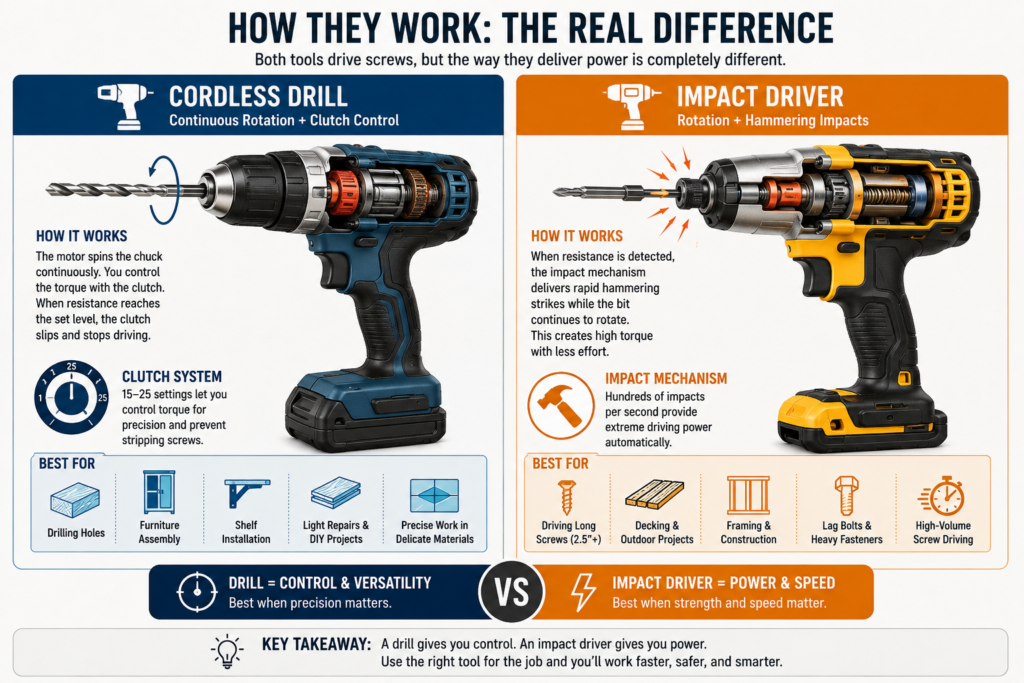
Impact Driver vs Drill — Side by Side Comparison
| Feature | Cordless Drill | Impact Driver |
|---|---|---|
| Primary use | Drilling holes + driving screws | Driving screws + fasteners |
| Chuck type | Keyless chuck (holds any bit) | Hex collet (1/4″ hex bits only) |
| Torque | 300–600 in-lbs typical | 1,500–1,800 in-lbs typical |
| Clutch control | Yes — 15 to 25 settings | No clutch |
| Noise level | Moderate | Loud (hammering mechanism) |
| Wrist strain | More (reaction torque felt) | Less (impacts absorbed internally) |
| Size and weight | Slightly larger and heavier | More compact and lighter |
| Drilling holes | Excellent | Limited (only with hex shank bits) |
| Long screws | Struggles with 3″+ screws | Handles with ease |
| Screw stripping risk | Low (clutch prevents it) | Higher without care |
| Best for | DIY, general use, precision work | Construction, decking, framing |
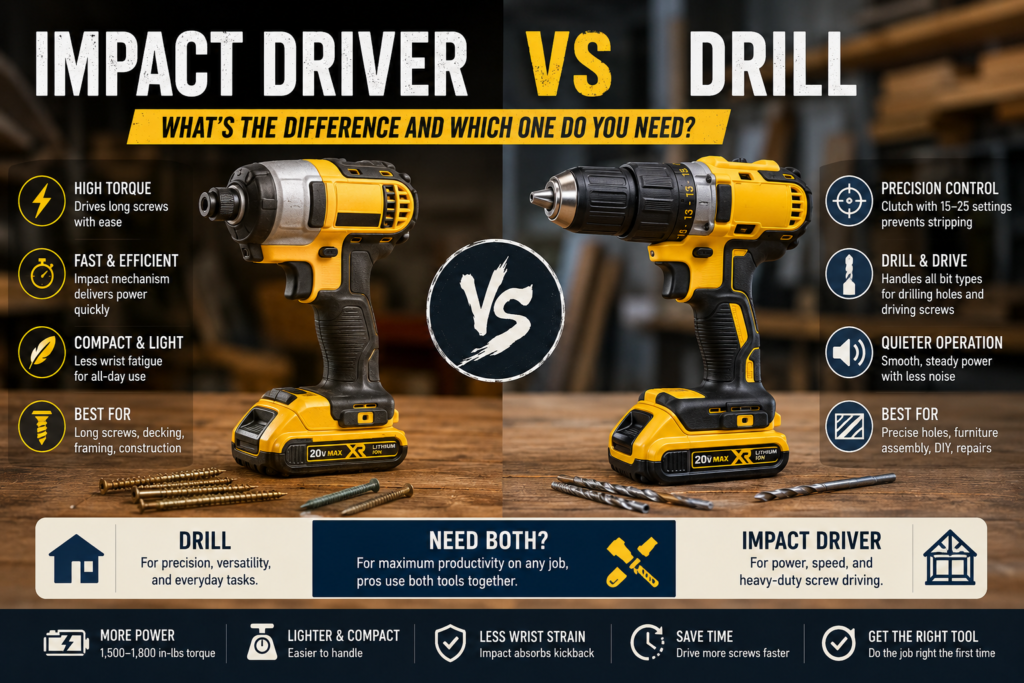
When to Use a Drill
A cordless drill is the better choice when precision matters more than speed or power. If you are assembling flat-pack furniture, hanging shelves, or working with delicate materials like cabinet doors or thin wood panels, the drill’s clutch system gives you the control you need to avoid over-driving screws or splitting the material.
The drill is also the only sensible choice when you need to bore holes. While an impact driver can technically drill holes using hex shank bits, the results are inconsistent and the tool is not designed for it. For clean, accurate holes in wood, metal, or tile — use a drill.
Use a drill when:
- You need to drill precise holes
- You are working with delicate or thin materials
- You need adjustable torque control
- You are doing light screw driving into softwood or drywall
- You need to use spade bits, hole saws, or auger bits
When to Use an Impact Driver
An impact driver is the better choice when you need raw power and speed. If you are building a deck, installing subfloor, framing a wall, or driving dozens of 3-inch screws in a session, an impact driver will make the job dramatically faster and easier on your wrist and arm.
The impact mechanism also means that when resistance increases — for example when a screw hits a knot in wood — the tool automatically increases its driving force rather than bogging down. This makes it far more efficient in demanding conditions.
Use an impact driver when:
- You are driving long screws (2.5 inches or more)
- You are doing high-volume screw driving
- You are working on construction, decking, or framing
- You need to drive lag bolts or structural screws
- You want less wrist fatigue over long sessions
Pros and Cons
Cordless Drill
| ✅ Pros * Versatile — drills and drives * Clutch prevents stripping * Works with all bit types * Better for precision work * Quieter operation | ❌ Cons * Less torque than impact driver * Struggles with long screws * More wrist strain at high torque * Slower for high-volume driving |
Impact Driver
| ✅ Pros * Extremely high torque * Compact and lightweight * Less wrist strain * Handles long screws easily * Faster for bulk driving tasks | ❌ Cons * No clutch — harder to control * Louder than a drill * Limited to 1/4″ hex bits * Higher risk of stripping screws * Not ideal for precision drilling |
Do You Need Both?
For most homeowners and DIY users, a drill covers 90% of what you need. If you only buy one tool, buy the drill.
However, if you do any kind of construction work, decking, or regularly drive screws into hardwood or structural materials, having both tools is genuinely worth it. Many professionals keep a drill in one hand for holes and an impact driver in the other for screws — switching between the two constantly on the same job.
If budget is a concern, many brands sell combo kits that include both tools with a shared battery, which brings the combined cost down significantly compared to buying each separately.
Recommended Models in 2026
| Tool | Model | Best For |
|---|---|---|
| Best drill for most people | DeWalt DCD771 | Home DIY and general use |
| Best brushless drill | Makita XFD131 | Regular DIY and light professional |
| Best impact driver | DeWalt DCF787 | Compact, lightweight, high torque |
| Best combo kit | DeWalt DCK240C2 | Drill + impact driver, shared battery |
For a detailed look at individual models, read our DeWalt 20V Max Drill Review, our DeWalt 20V Impact Driver Review, and our Makita XFD131 Cordless Drill Review.
Quick Decision Guide
| Your situation | Get this |
|---|---|
| First tool, general home use | Drill |
| Building a deck or fence | Impact Driver |
| Furniture assembly and light repairs | Drill |
| Professional construction work | Both |
| Drilling into tile or masonry | Drill (hammer drill mode) |
| Driving 100+ screws per session | Impact Driver |
The Following tool will answer your question to help you make the decision:
Impact Driver vs Drill Decision Tool
Answer a few quick questions to find out which tool is right for you.
Frequently Asked Questions
Can I use an impact driver as a drill?
Technically yes, but it is not recommended for precision drilling. Impact drivers only accept 1/4 inch hex shank bits and do not have a clutch, which makes it difficult to control hole depth and size. For clean, accurate holes use a proper cordless drill.
Can I use a drill instead of an impact driver?
For light to medium screw driving, yes. However, for driving long screws or lag bolts, a standard drill will struggle and may overheat. The clutch will disengage before the screw is fully seated in hard materials. An impact driver handles these tasks far more efficiently.
Why does my wrist hurt when using a drill but not an impact driver?
A standard drill transfers rotational force directly to your wrist when it meets resistance. An impact driver absorbs that force internally through its hammering mechanism, which is why it feels much easier to use over long sessions even though it is delivering far more torque.
Is an impact driver better than a drill for home use?
Not necessarily. For home use a drill is more versatile because it can both drill holes and drive screws with precision. An impact driver is only better when you are regularly driving long or structural screws. For most homeowners, a drill is the more practical single-tool choice.
What is the difference between an impact driver and an impact wrench?
An impact driver uses 1/4 inch hex bits and is designed for screws and small fasteners. An impact wrench uses square drive sockets and is designed for large bolts and lug nuts, such as on vehicles. They work on the same principle but are built for completely different tasks.
Do impact drivers strip screws?
They can, especially on softer materials or when using worn bits. Because impact drivers have no clutch, they keep driving until you release the trigger. Using the correct bit size, good quality bits, and a controlled trigger technique reduces stripping significantly.
Should I buy a combo kit or separate tools?
If you think you will use both tools regularly, a combo kit is almost always better value. Brands like DeWalt, Makita, and Milwaukee sell drill plus impact driver kits that share a battery platform, which saves money on both the tools and future battery purchases.
Which is better for driving deck screws — drill or impact driver?
Impact driver, without question. Deck screws are typically 2.5 to 3.5 inches long and need to be driven into hardwood or treated lumber. A drill will bog down and potentially strip these screws or damage the bit. An impact driver handles deck screws quickly and cleanly with minimal effort.